Presto AI Dash

Always in view. Never in your way.
Monitor AI usage, subscription limits, reset times, and service health across your accounts—all at a glance on a dedicated display.
No windows. No screen clutter. Just the information you need.
Presto AI Dash is an open-source, self-hosted monitor for a Pimoroni Presto. Its physical panel is 480x480; the app draws on a 240x240 logical canvas, with seven LEDs and a buzzer for alerts. A separate computer or server runs the Python daemon or Docker container that collects the readings; the display connects over Wi-Fi.
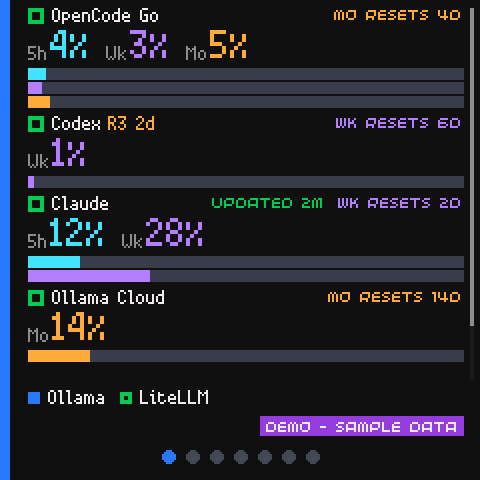
Want to try it first? See it running in your browser: the real app, on sample data.
Everything runs on your own machines. There is no account to create, nothing is sent to a server we do not control, and the dashboard never spends, resets or changes anything on a provider account. See Privacy.
What it does
- Shows subscription quotas with the real period labels the providers use: Claude's 5-hour and weekly windows, Codex's allowance buckets, and OpenCode Go's 5-hour, weekly and monthly windows.
- Shows local services: whether Ollama is reachable and which model is loaded, and the requests, tokens and spend LiteLLM routed today.
- Shows local Claude Code activity: when you last used Claude, from which surface, and how many tokens the local session logs account for.
- Tells you why a number is missing or old instead of showing a confident zero. Every number says where it came from.
- Alerts you: the LED, and a short sound when a service gets worse, with per-service thresholds and quiet hours. The sound is off until you turn it on.
How it works
Two pieces, on your LAN:
The daemon runs on a computer you control, collects from the services you configure, keeps a short local history in SQLite and serves one JSON endpoint. The Presto holds no provider secrets, makes no provider calls and only displays what the daemon sends it.
The daemon is the only thing that talks to a provider, and it only ever reads documented usage and limit data. The one thing the Presto can write is a setting on your own daemon: whether one service's alerts are on or off.
Start here
- What Presto AI Dash does - a longer tour.
- Install the daemon.
- Set up the Presto.
- Add the first source.
If something is already installed and broken, go straight to Troubleshooting.
The sources it can read
| Source | What you get |
|---|---|
| Claude | 5-hour and weekly quota, local activity, and the usage cache Claude Code writes |
| Codex | Allowance buckets, percentages and resets, plus banked reset credits |
| OpenCode Go | 5-hour, weekly and monthly percentages and resets |
| Ollama Cloud | Dated activity totals: requests, tokens and spend |
| Ollama | Local server health, loaded model, measured speed |
| LiteLLM | Routed requests, tokens, spend, errors and top model |
Every one of these is optional. To see the display work before you connect an account, turn on Demo mode on the admin page's Settings tab: six sample accounts are shown, clearly labelled, and the real readings come back when you turn it off.
Want another source?
Request a source on GitHub if you'd like support for another provider, subscription or local service. No programming or API knowledge is required. Developers can contribute a source directly through a pull request using the existing source and test templates.
What it will never do
- It will not spend, redeem, reset or change anything on a provider account.
- It will not send a prompt or a model request to produce a number.
- It will not send anything about you anywhere.
- It will not show a missing reading as
0%.
The Privacy page says this in more detail, including what is read from your machine and what is stored.
Licence
MIT. The repository ships no provider logos or artwork. The host-side preview tools carry bitmap font data generated from Pimoroni's MIT-licensed fonts; its notice is in THIRD_PARTY_NOTICES.md in the repository.