See it running
This is the real Presto AI Dash app, the same code that runs on the device, drawing a scripted set of sample accounts. Press Start, then use it like the Presto: click a row to open it, swipe to move between cards, hold to mute.
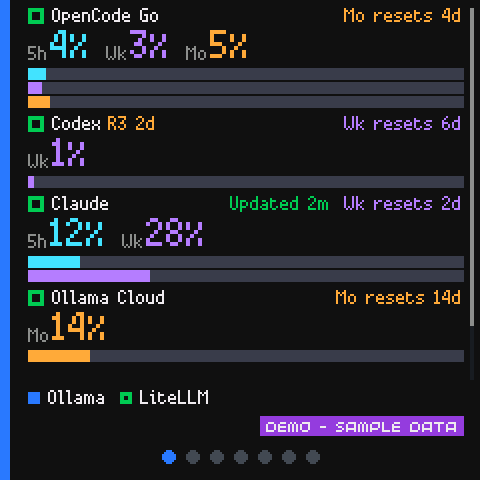
Sample data, not a live account. Click or tap to press, drag to swipe or scroll, hold to mute. With the screen focused: arrow keys, Enter, and M.
What you are looking at
- The code is the device's. The page runs the app's own Python modules in your browser, using MicroPython compiled to WebAssembly. Nothing is sent anywhere, and no account is involved.
- The numbers are made up. Six accounts (OpenCode Go, Codex, Claude, Ollama Cloud, Ollama and LiteLLM) play through a 90-second scenario: calm, climbing, a warning, a near-limit, critical, rate-limited, offline and recovery. Use the Scene menu to jump to one.
- The account details are part of the demo. OpenCode Go has three quota
windows; Codex shows banked resets and their expiry. In warning, its weekly
reading is stale and a missing 5-hour reading shows
--. Claude shows activity and credit tiles. Ollama Cloud shows monthly included credits, a separate purchased balance and rolling seven-day activity. In critical, Cloud has exhausted its included credits but still has purchased funds. In rate_limited, Cloud's month refills while Claude hits its limit, showing that accounts reset independently. In offline, Cloud retains those readings as stale; recovery restores fresh readings. - The purple chip is always there. It says the readings are sample data. A daemon in demo mode shows the same chip on a real Presto.
- Stale pretends the daemon has gone away, so you can watch the screen go stale and then show the full offline screen after 30 seconds, and recover when you untick it. The offline scene keeps the daemon reachable while two providers stop reporting, so their failures remain visible in the account list.
To run it on your own Presto, start with what Presto AI Dash does. Without JavaScript this page shows a picture of the Home screen instead.